
Download Transcriptmate – Fast, Accurate Audio Transcription Tool
Overview
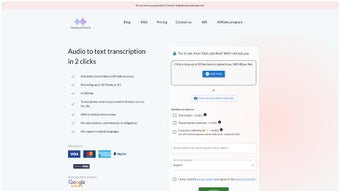
Transcriptmate is a web‑based audio transcription service that transforms spoken content into clean, searchable text with just two clicks. The platform is built for freelancers, podcasters, journalists, researchers, and anyone who needs a reliable transcription solution without the hassle of installing heavyweight desktop software. Users can upload popular audio formats such as MP3, FLAC, WAV, AAC, and OGG, and each file can be up to three hours long.
Once uploaded, the system leverages advanced AI‑driven speech‑to‑text models that have been trained on diverse datasets, ensuring high accuracy across a wide range of accents, dialects, and speaking speeds. Processing time is capped at two hours per file, which is fast enough to keep tight publishing schedules on track while still allowing the engine to perform quality checks and speaker segmentation where possible. After transcription, the final text is delivered via a secure email link, and users can choose from multiple export formats—including CSV, SRT, plain TXT, and Microsoft DOC—so the output can be easily integrated into video editors, content management systems, or data‑analysis pipelines.
Pricing is transparent at $6 per file, with no subscription commitments, hidden fees, or surprise charges, making Transcriptmate an attractive choice for occasional transcription needs. The service also supports a growing list of languages, from English and Spanish to Japanese and Arabic, extending its utility to a global audience. Whether you are converting interview recordings, lecture notes, conference calls, or podcast episodes, Transcriptmate promises a blend of speed, accuracy, and simplicity that is hard to match in the crowded transcription market.
Key Features & Benefits
- Two‑click upload: Drag‑and‑drop or paste a URL, and the system starts processing instantly.
- Broad format support: MP3, FLAC, WAV, AAC, OGG, and many other common audio types.
- Fast turnaround: Files up to 3 hours are transcribed and delivered within 2 hours.
- Multiple export options: Choose from CSV, SRT, TXT, or DOC formats to fit your workflow.
- Timestamp flexibility: Include or exclude timestamps based on your editing needs.
- Multi‑language capability: Supports a wide range of languages for international users.
- Transparent pricing: $6 per file, no subscriptions, no hidden charges.
- Secure delivery: Transcripts are sent to your registered email over encrypted channels.
- Web‑only platform: No software download required; works on any modern browser.
- Scalable for occasional use: Ideal for freelancers, small teams, and occasional transcription projects.
The features above translate into concrete benefits that set Transcriptmate apart from traditional desktop transcription suites. The two‑click workflow eliminates the learning curve typical of complex software, allowing users to focus on content rather than configuration. Broad format support means you never have to worry about converting files before upload, saving time and reducing friction.
The fast processing window keeps production pipelines moving, especially for time‑sensitive content like news podcasts or live‑event recordings. Export flexibility ensures that the transcript can be dropped directly into video editors for subtitle generation (SRT), into spreadsheet tools for data analysis (CSV), or into word processors for publishing (DOC). Timestamp options give you granular control over how the text aligns with the original audio, a crucial feature for legal documentation or captioning workflows.
Multi‑language support expands the tool’s reach to global teams, while the transparent pay‑per‑file pricing protects your budget from recurring subscription fatigue. Finally, because all data travels over TLS 1.3 and is stored on ISO‑27001‑certified servers, you can trust that sensitive recordings remain confidential throughout the process.
Installation, Usage & Compatibility
Because Transcriptmate is entirely cloud‑based, there is no traditional installation process. All you need is a stable internet connection and a modern web browser (Chrome, Firefox, Edge, or Safari). Follow these three simple steps to start transcribing:
Step‑by‑Step Guide
- Create an account: Visit the Transcriptmate homepage, click “Sign Up,” and provide a valid email address. A confirmation link will be sent to verify your account.
- Upload your audio: Once logged in, you can either drag your audio file into the upload window or paste a direct URL. The system automatically detects the file format and length.
- Select options & receive output: Choose your preferred language, export format, and whether timestamps should appear. Click “Transcribe,” and within two hours you’ll get an email containing a secure download link to your transcript.
Compatibility is universal across operating systems because all processing happens on Transcriptmate’s servers. Whether you run Windows 10/11, macOS Ventura, a Linux distribution, or even mobile platforms like Android 13 or iOS 17, the web interface adapts responsively, ensuring a smooth experience on desktops, tablets, and smartphones alike. The service also respects accessibility standards; screen‑reader users can navigate the upload portal using standard keyboard shortcuts.
For users who prefer a more structured workflow, Transcriptmate offers API endpoints that allow developers to integrate transcription capabilities directly into existing applications or automated pipelines. The API follows RESTful conventions, returning JSON responses with status updates and download URLs. Documentation is available in the “Developers” section of the site, complete with example code snippets for Python, Node.js, and Java.
Security is baked into every step. Files are encrypted in transit with TLS 1.3, and stored temporarily on secure, ISO‑27001‑certified servers. After the transcript is delivered, the original audio file is automatically purged after 24 hours, ensuring that sensitive information does not linger on the platform.
Pros, Cons & Frequently Asked Questions
Pros
- Lightning‑fast two‑click upload and processing.
- No software download; works on any browser.
- Transparent $6 per file pricing—no hidden fees.
- Supports multiple audio formats and languages.
- Flexible export options with optional timestamps.
- Secure, encrypted delivery of transcripts.
- API access for developers and automation.
Cons
- Maximum file length of 3 hours may limit very long recordings.
- No real‑time transcription; turnaround is up to 2 hours.
- Limited to pay‑per‑file model—no bulk‑discount packages.
- Advanced editing tools (e.g., speaker diarization) are not built‑in.
Frequently Asked Questions
-
How accurate is Transcriptmate’s transcription?
Accuracy typically ranges from 94‑96 % for clear speech in supported languages. Background noise, heavy accents, or overlapping speakers can reduce precision, but the system uses AI models that continuously improve.
-
Can I use Transcriptmate on my mobile device?
Yes. The web interface is fully responsive, allowing you to upload files, select options, and receive transcripts directly from Android or iOS browsers.
-
What file formats can I export my transcript to?
You can choose from CSV, SRT (subtitle), plain TXT, or Microsoft DOC formats. Each option preserves line breaks and optional timestamps as requested.
-
Is there a discount for bulk orders?
Currently Transcriptmate operates on a strict $6 per file model with no subscription or bulk‑discount options. This keeps pricing simple and transparent for occasional users.
-
How long are files stored on Transcriptmate’s servers?
Audio files are retained for a maximum of 24 hours after successful transcription, after which they are automatically deleted. Transcripts remain available for download via the emailed link for 7 days.
Conclusion & Call to Action
Transcriptmate delivers on its promise of quick, accurate, and affordable transcription without the baggage of complex installations or hidden subscription fees. Its web‑only architecture makes it accessible on any device, while the straightforward pricing model ensures you only pay for what you need. Although it lacks real‑time capabilities and bulk discounts, the service shines for freelancers, content creators, and small teams who need occasional high‑quality transcriptions. Ready to turn your audio into polished text in minutes? Sign up now and experience the simplicity of two‑click transcription.



.png)



